
Download CommView for WiFi – WiFi analyzer, network monitor, packet capture, wireless network troubleshooting, network traffic analysis
Overview
CommView for WiFi is a specialized mobile application designed for in-depth analysis of 802.11 a/b/g/n wireless networks. The app functions as a comprehensive network monitor and packet analyzer, providing users with detailed insights into network traffic. Its primary purpose is to assist professionals in identifying network performance issues, diagnosing connectivity problems, and ensuring secure and efficient wireless operations. The tool is particularly valuable for wireless LAN administrators, network security experts, and developers who require granular visibility into network communications.
By enabling users to capture, examine, and interpret network packets, CommView for WiFi addresses the need for real-time diagnostics in complex wireless environments. It supports a wide range of use cases, from troubleshooting intermittent connectivity issues to analyzing voice-over-IP (VoIP) traffic for quality assurance. The app is tailored for users who demand precision and control over their network data, offering capabilities typically found in desktop-grade tools but adapted for mobile use.
Developed by TamoSoft, a company known for network analysis software, CommView for WiFi reflects a focus on technical accuracy and functionality. The application is not intended for casual users but rather for individuals with technical expertise in networking. It plays a critical role in the mobile productivity ecosystem by extending advanced diagnostic tools to handheld devices, allowing professionals to conduct on-site evaluations without relying solely on desktop systems.
Key Features & Functionality
- In-Depth Packet Analysis: The app supports over 70 protocols, presenting packet data through a hierarchical tree structure that reveals protocol layers and header details. This allows users to inspect each component of a packet, making it easier to detect anomalies or misconfigurations.
- On-the-Fly and Post-Capture Decryption: Users can decrypt encrypted data using predefined WEP keys or WPA passphrases. This enables access to sensitive traffic information during live monitoring or after data collection, enhancing the scope of analysis.
- TCP Session Reconstruction: With minimal interaction, users can reconstruct TCP sessions and observe application-level data exchange. This feature is essential for diagnosing application-specific issues and identifying bottlenecks in data flow.
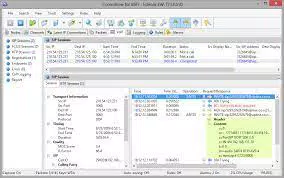
- VoIP Module Integration: The app includes a dedicated module for analyzing SIP and H.323 voice communications. It supports recording and playback of voice sessions, which is crucial for assessing call quality and detecting potential interference or packet loss.
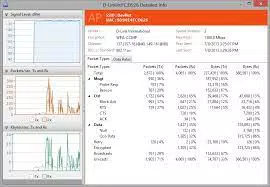
- Wireless Network Troubleshooting: By visualizing traffic patterns and identifying unauthorized devices or unusual activity, the app helps users maintain network integrity and performance.
These features are particularly useful in real-world scenarios such as diagnosing slow VoIP calls, detecting rogue access points, or validating security configurations. The tool empowers technical users to make data-driven decisions during network audits or incident responses.
Interface, UX & Performance
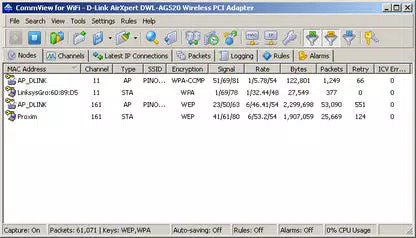
CommView for WiFi presents a functional and technically oriented interface, optimized for users with experience in network diagnostics. The layout emphasizes data clarity, with layered views for packet inspection and dedicated sections for session reconstruction and VoIP analysis. Navigation is structured around core functions, allowing quick access to capture, analysis, and playback tools.
Although the developer did not list formal performance metrics, the app’s design suggests a focus on responsiveness and stability during active monitoring. The interface remains usable across various screen sizes, indicating adaptability to different Android devices. Users can expect consistent performance during packet capture and analysis, though actual results may vary depending on device capabilities and network conditions.
Responsiveness is likely maintained through efficient data handling and minimal resource consumption, given the app’s compact size of 10.8 MB. The lack of visual clutter supports focused work, which is essential for professionals under time pressure. Stability is critical in diagnostic tools, and the app appears to be built with reliability in mind, though real-world testing is recommended for high-load scenarios.
Platform Compatibility & Technical Requirements
CommView for WiFi is available exclusively on the Android platform. It is compatible with devices running Android OS, though specific minimum version requirements were not listed by the developer. The app has a file size of 10.8 MB, indicating a lightweight footprint that should not strain device storage.
While the developer did not specify exact OS version compatibility or hardware requirements, the app’s design suggests it is optimized for modern Android devices with Wi-Fi capabilities. Users should ensure their device supports packet capture functionality, as this is essential for the app’s core features. The lack of detailed technical specifications means compatibility may vary depending on device configuration and system permissions.
Pros and Cons
Pros
- Advanced packet analysis with support for over 70 protocols
- Capable of decrypting WEP and WPA-secured traffic
- Efficient TCP session reconstruction with minimal user input
- Integrated VoIP module for SIP and H.323 traffic analysis
- Compact size (10.8 MB) with optimized resource usage
Cons
- Price point of $29.95 may be prohibitive for casual users
- No publicly available information on minimum OS or hardware requirements
- Interface may be complex for non-technical users
- Requires device-level permissions for packet capture
- Not available on iOS or other platforms
FAQ
Is CommView for WiFi secure to use?
Yes, the app is designed for authorized network monitoring and analysis. It only captures data from networks the user has access to, and it requires explicit permission to operate on the device.
Can I use CommView for WiFi on iOS devices?
Currently, the app is only available for Android. There is no iOS version available at this time.
What do I need to start capturing network traffic?
You need a compatible Android device with Wi-Fi capabilities and appropriate system permissions. The device must also support packet capture, which is typically available on rooted or enterprise-grade devices.
How often should I update CommView for WiFi?
It is recommended to install updates as they become available to ensure compatibility with new protocols, security patches, and performance improvements.
Does CommView for WiFi require an internet connection to function?
No, the app can operate offline after installation. It does not require an internet connection to capture or analyze network traffic.
Final Thoughts
CommView for WiFi stands out as a powerful, specialized tool for professionals who need detailed insights into wireless network operations. Its ability to analyze packets, decrypt secured traffic, reconstruct TCP sessions, and monitor VoIP communications makes it a vital asset in network diagnostics and security assessments. While the price and technical nature of the app limit its accessibility to non-experts, it delivers significant value for its target audience.
For wireless network administrators, security analysts, and developers, the app offers a mobile solution that brings desktop-level functionality to the field. Its compact size and focused design ensure efficient performance on modern Android devices. The lack of platform availability on iOS and unclear system requirements are notable limitations, but the app’s core capabilities remain robust.
Download CommView for WiFi now


